Getting started
This version requires AMPL to run. AMPL installation requires a License (free for students). We experienced some issues to install AMPL due to the different machines. Feel free to contact AMPL support.
Once AMPL installed and usable, the model can be run as described hereafter:
How to run the model:
Clone/download the content of this folder
Navigate to the folder ‘STEP_2_Energy_Model’ folder via terminal/cmd prompt and execute (check glpsol documentation for more options):
ampl PESTD_main.run
3. Check the output files: Descriptions of outputs files and folders:
For the transition: The output folder accounts for different text file representing key output of the transition.
For each year: - ./assets.txt : Installed capacity of each technology and its specific cost, gwp… - ./cost_breakdown.txt : Cost of resources and technologies. - ./gwp_breakdown.txt : GWP of resources and technologies. - ./losses.txt : Losses in the networks. - ./hourly_data/ : Folder containing the hourly data for each layer and for each storage technology. - ./sankey/ : Folder containing the SANKEY diagram.
To open the Sankey diagram, open the ESTD_sankey.html file. The browser should indicate the following figure:
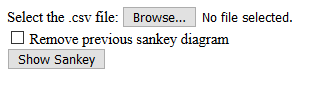
Click on the Browse button and select the Sankey file input2sankey. Finally, click on the Show Sankey button.